 Kuruvu
Enter your daily race plan
The planner is the heart of the rider app. For each day you tell Kuruvu when you expect to reach each support station, where you'll sleep, and which stops you'll skip — and every change saves itself, so your crews and the race office can plan around you.
Haven't installed the app yet? Start with Install on your phone. You can build your plan with a connection at home or the start village — it syncs and is then available offline on course.
Reading the plan
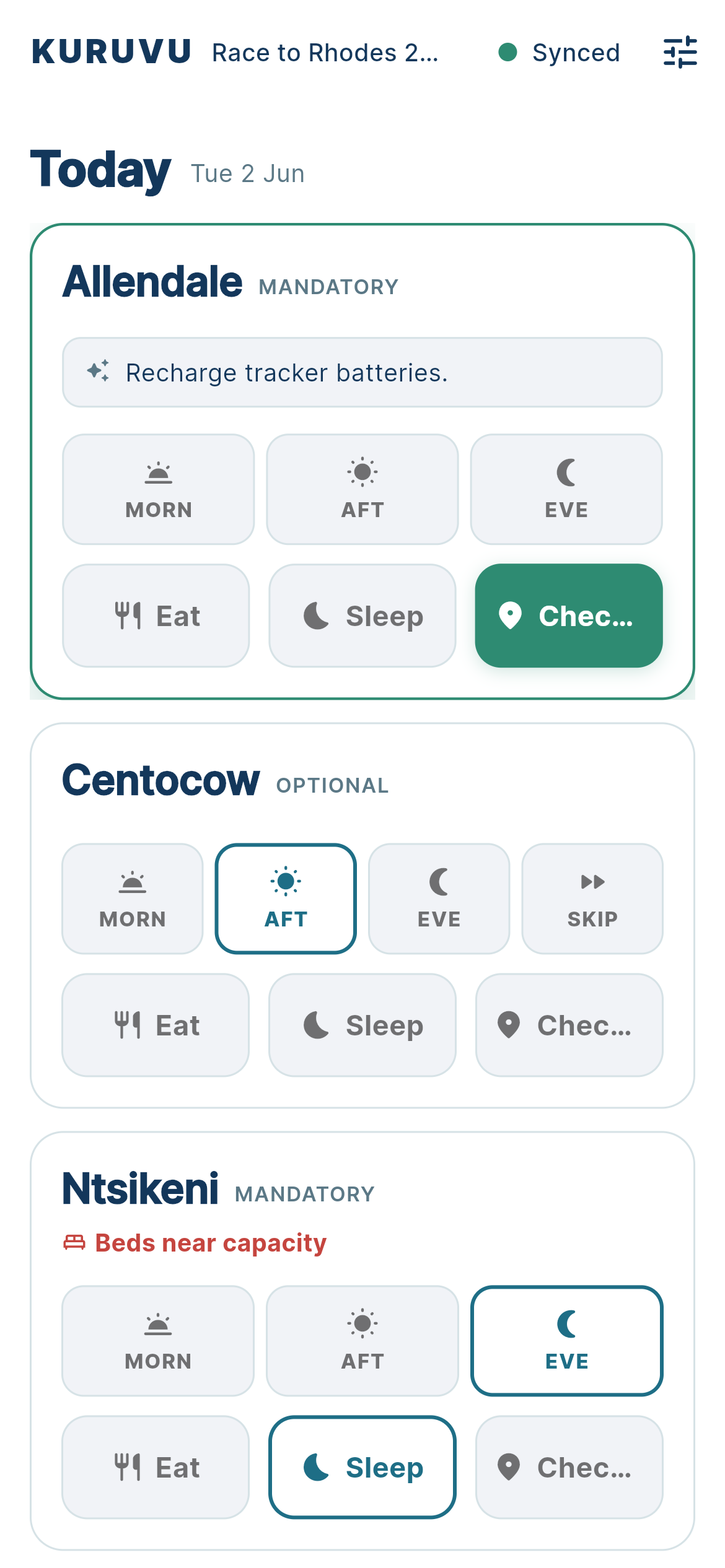
Open the app and you land on the planner. It opens on Today and lists every support station ahead of you, in order, grouped by day.
Each station is a card showing its name and whether it's MANDATORY or OPTIONAL. The Synced badge at the top confirms your plan is saved.
Set your arrival windows
For each station, tap the time of day you expect to arrive:
- Morn, Aft, or Eve — your expected arrival window. The selected window is outlined.
- Your choice tells crews and the race office roughly when to expect you.
- Change it any time — re-tap a different window and the plan updates instantly.
Windows are estimates, not commitments. Set your best guess and adjust as your race unfolds.
Choose where you sleep
On each station card, the Sleep control marks it as where you'll rest for the night. Tap Sleep on the station you're aiming to sleep at — it highlights to show it's your sleep stop for that day.
- Sleep is one per day — choosing it on a different station moves your sleep marker there.
- The day boundary follows your sleep choice, so picking where you sleep is what shapes each day's plan.
- Use Eat to mark a stop where you'll pause for a meal but not sleep over — a daytime stop, as opposed to your overnight Sleep station.
Skip the stops you won't use
Optional stations show a Skip control. Tap it to tell Kuruvu you'll ride straight through without stopping:
- Skip is a toggle — tap it again to un-skip if your plans change.
- Skipping keeps crews from staging supplies for a rider who isn't stopping.
- Mandatory stations don't show Skip — they're required stops on the route.
Your plan saves itself
There's no separate save or confirm step. Every choice — an arrival window, a sleep stop, a skip — is saved the moment you make it. The Synced badge at the top of the planner is your confirmation that the race office and your crews have the current picture.
Made a change with no signal? It's stored on your phone and syncs automatically the moment you reconnect.
Plan the days ahead
Below today, the planner continues with Tomorrow and every following day, each with its own stations. Scroll down to set arrival windows, sleep stops, and skips for the whole race in advance.
As you ride and reach each station, the planner keeps the picture current — completed stops drop away and the next station ahead becomes your focus.
Build or change your plan while you have signal — at home or the start village. Edits made offline are saved on your phone and sync automatically the moment you reconnect.